

You’ve probably had that moment. You publish what you think is a cracking LinkedIn post, only to see a competitor’s update quietly rack up three times the engagement. You’re left wondering if they know something you don’t. Spoiler: they probably don’t. They’re just using the data LinkedIn already gives you.
The good news is you can use it too. LinkedIn competitor analytics aren’t hidden behind some premium paywall. They’re sitting right there in your Company Page dashboard, waiting for you to stop guessing and start measuring.
Let me walk you through how I use it, what it actually tells you, and how you can turn it into a weekly habit that sharpens your content instead of leaving you feeling behind.
Why competitor analytics matter
If you have ever felt like you are posting into the void, competitor analytics fix that. They give you context. They give you a baseline. They give you something to measure against that is not your own mood on the day. Most people judge their LinkedIn performance emotionally. They publish a post, watch the numbers for an hour, and decide whether it is good or bad based on nothing more than instinct. Competitor analytics replace instinct with evidence.
When I first started using LinkedIn competitor analytics, I realised how blind I had been. I was comparing my engagement to my own expectations instead of the reality of the market. One competitor was posting at six in the morning Perth time every weekday. Their engagement was consistently higher than mine. I shifted my timing for a month and saw a twenty‑seven percent lift. No magic. Just visibility.
Competitor analytics matter because they show you:
- What “good” actually looks like in your industry. A post with thirty reactions might feel average until you realise your closest competitor averages twelve.
- Where your content sits in the broader landscape. You stop asking whether your engagement is good and start asking whether it is competitive.
- What your audience responds to across multiple voices. If three companies in your space all see strong engagement on hiring stories, that is not coincidence. That is a pattern.
- How fast your competitors are growing. Follower growth is not vanity. It is momentum. If they are accelerating and you are not, you need to know why.
- Which formats consistently win. If your competitors are getting traction with short videos and you are still publishing long text posts, the data into what types of LinkedIn posts win will make that obvious.
Competitor analytics also give you something more subtle: confidence. When you know how your content compares, you stop second‑guessing yourself. You stop rewriting posts three times because you are worried they will not land. You publish with intention instead of hesitation.
The other reason LinkedIn competitor analytics matter is simple. Your audience does not live in isolation. They see your content alongside your competitors’ content every single day. If you are not paying attention to what your competitors are doing, you are ignoring half the environment your audience is experiencing.
Competitor analytics do not tell you what to write. They tell you what the market is paying attention to. Once you know that, your content becomes sharper, more relevant, and far more strategic.
Where LinkedIn hides competitor tracking
LinkedIn loves burying useful features three clicks deep. Their LinkedIn competitor analytics screen is no exception.
You’ll find it here:
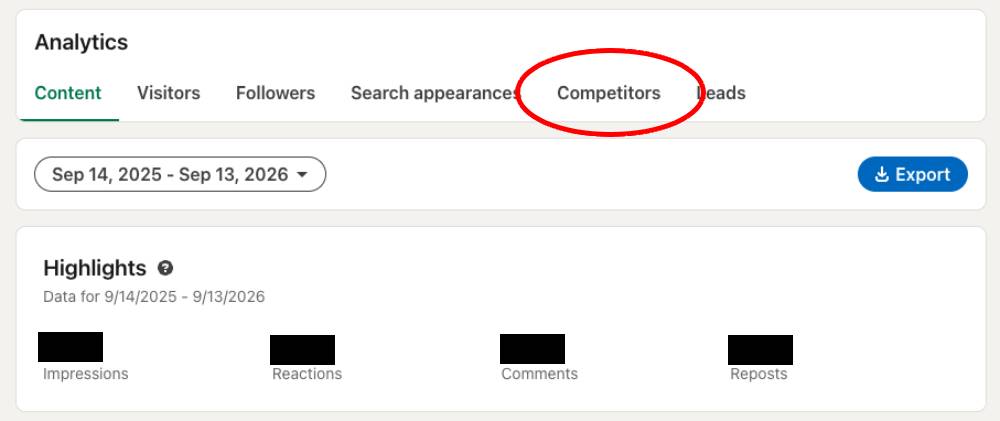
LinkedIn Company Page → Analytics → Competitors
That’s it. No secret handshake. No premium upsell. Just a dashboard that most people never bother opening.
Inside, you’ll see:
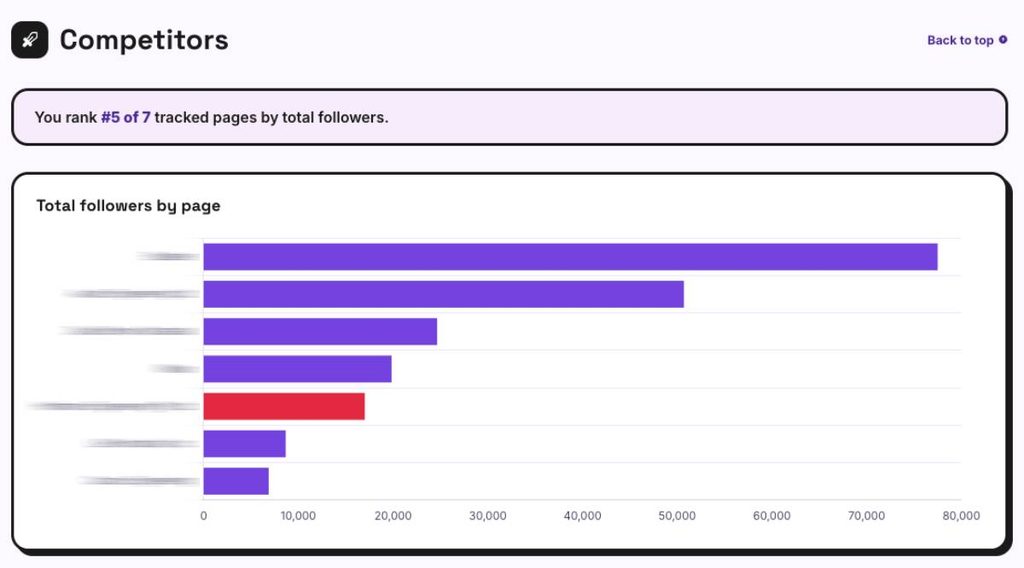
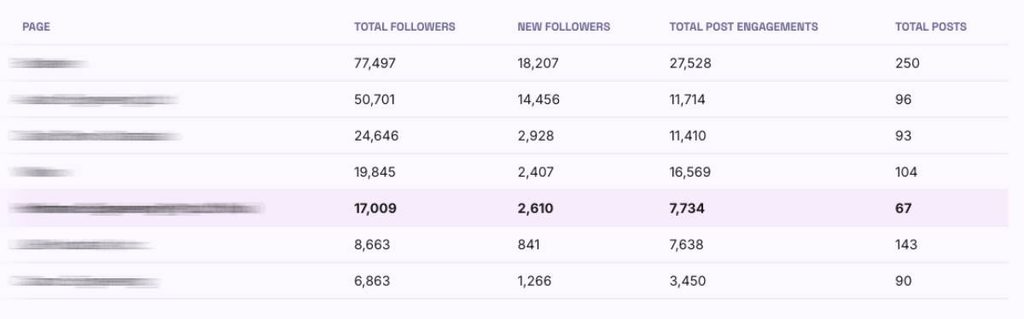
- Competitor follower growth
- Competitor engagement trends
- Their top-performing posts
- A simple benchmarking graph
This is the heart of LinkedIn competitor insights and how you are performing against your peers in the same industry.
Step-by-step: Setting up competitor tracking
Here’s the exact setup I use.
- Go to your Company Page. Click Analytics, then Competitors. It’s tucked away, but it’s there.
- Add competitors manually. LinkedIn will suggest a few pages, but don’t rely on that. Add the companies you actually care about — the ones your customers compare you to.
- Review the dashboard. You’ll see follower growth, engagement trends, and top posts. Each metric tells a different story.
- Create a weekly habit. I check competitor insights every Monday while my coffee is still too hot to drink. It takes five minutes and saves me hours of guessing.
This is where phrases like LinkedIn competitor benchmarking, LinkedIn competitor dashboard, and LinkedIn competitor metrics naturally fit.
What the data actually tells you
Let’s break down the metrics in plain language.
- Follower growth: Are they growing faster than you? If yes, why?
- Engagement rate: Are people actually responding to their content?
- Top posts: What LinkedIn content ideas and topics are consistently doing well?
- Format trends: Are they leaning into video, text, or carousels?
I once misread a spike and thought a competitor had cracked some secret formula. Turns out they’d just posted a photo of their office dog. Happens to the best of us.
How to use competitor analytics to improve your content
LinkedIn competitor analytics only matter if you turn the numbers into decisions. The dashboard itself will not improve your content. Your interpretation will. When you look at your competitors each week, you are not trying to copy them. You are trying to understand the environment you are publishing into. Once you see the patterns, you can adjust your own approach with confidence instead of guesswork.
Here is how I use the data in practice.
1. Timing: publish when your audience is already active
If you notice your competitors consistently earn engagement at seven in the morning, that is not an accident. It means your shared audience is awake, scrolling, and willing to interact. Test it. Shift your next three posts into that window and watch the difference.
I once moved a fortnight of posts from mid‑morning to early morning and saw a noticeable lift. Nothing dramatic, but enough to prove the point. Timing is one of the easiest levers to adjust, and competitor analytics make it obvious.
2. Topics: identify themes that consistently win
Look at the top posts in your competitor dashboard. You will start to see themes. Industry myths. Hiring challenges. Productivity frustrations. Regulatory changes. If three of their top posts revolve around a single topic, that is a signal. It means the audience cares.
Write your own take. Not a copy. A perspective grounded in your experience. Your voice is the differentiator. Competitor analytics simply show you where the attention already is.
3. Format: lean into what your audience actually consumes
LinkedIn formats are not equal. Some audiences love video. Others prefer text posts. Some respond to carousels. LinkedIn competitor analytics show you which formats consistently perform for the companies you benchmark against.
If your competitors’ videos outperform your text posts, run a small experiment. Create three short videos. Publish them over two weeks. Compare the results. You do not need a studio. You need clarity and consistency.
4. Momentum: watch for sudden spikes and drops
A spike in competitor engagement usually means one of three things:
- They posted something genuinely useful
- They hit a trending topic
- They shared something personal that resonated
A drop usually means the opposite. Poor timing. Weak topic. Overly promotional content.
These spikes and drops help you calibrate your own expectations. If everyone’s engagement dips in the same week, it is not your content. It is the platform’s mood.
5. Gaps: find the topics your competitors are ignoring
This is the most valuable part of competitor analytics. Look for the gaps. If none of your competitors are talking about a particular challenge, and you know your audience faces it, that is your opportunity.
For example, I noticed competitors were posting heavily about industry trends but almost never about operational frustrations. I wrote a post about a small workflow issue that annoys everyone in the sector. It became one of my most saved posts that quarter. The gap was obvious once I looked for it.
6. Consistency: build a rhythm that compounds over time
Competitor analytics are not a one‑off activity. They are a weekly habit. When you check the dashboard regularly, you start to see patterns that you would never notice in isolation. You also stop overreacting to single posts that underperform.
A simple rhythm works:
- Review competitor top posts
- Note timing patterns
- Identify one topic worth exploring
- Publish your next piece with intention
Small adjustments compound. That is the real value of competitor analytics.
A simple weekly checklist
Use this once a week to watch your LinkedIn competitor analytics as well as your own content success. Maybe put it in your calendar as a recurring event, so you always remember.
- Follower growth comparison
- Engagement rate comparison
- Top competitor posts
- Your next three content ideas
It’s quick. It’s practical. And it keeps you honest.
Frequently Asked Questions
1. What are LinkedIn competitor analytics?
LinkedIn competitor analytics are the metrics LinkedIn gives you inside your Company Page to help you understand how your content compares to similar organisations. You can see follower growth, engagement trends, and your competitors’ top posts. It is the simplest way to stop guessing and start benchmarking your performance properly.
2. Where do I find competitor tracking in LinkedIn?
You will find it under Analytics → Competitors on your LinkedIn Company Page. LinkedIn hides it a little deeper than it should, but once you know where it is, it becomes part of your weekly rhythm. Add your competitors manually so you are tracking the companies your customers actually compare you to.
3. How many competitors should I track?
Most organisations only need five to ten. Any more than that and the data becomes noise. Choose the companies your audience sees as alternatives to you. If you are unsure, look at who comments on your posts, who your customers mention, and who appears in your sales conversations.
4. What should I look for in competitor analytics?
Focus on four things:
- Their follower growth
- Their engagement trends
- Their top‑performing posts
- Their posting patterns
These four data points will tell you what the market is paying attention to. Once you see the patterns, you can adjust your timing, topics, and formats with far greater confidence.
5. Will competitor analytics improve my content?
Yes, but only if you use the data intentionally. Competitor analytics will not write your content for you. They simply show you what is working across your industry. When you combine that visibility with your own experience, your content becomes sharper, more relevant, and far more competitive.
Wrap-up
Watching your LinkedIn competitor analytics aren’t about copying. They’re about understanding the landscape you’re competing in. Once you start tracking, you’ll stop guessing. You’ll start making smarter decisions, and you’ll publish with confidence instead of crossing your fingers.
And if nothing else, it’s comforting to know your competitors also have posts that tank. We’re all human.